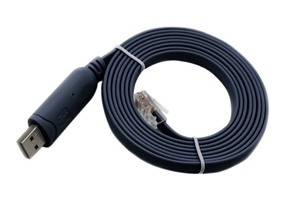
Product Description:
The Haitronic HS1881 is a USB-to-RJ45 Cisco console cable, used to connect a laptop directly to the console port of a Cisco router or switch for configuration and troubleshooting.
Application:
- Initial router or switch setup: Configure a Cisco device before it has an IP address or network access.
- Command-line access: Open the Cisco IOS command-line interface (CLI) from your laptop.
- Troubleshooting: Diagnose network problems, inspect device status, and change configuration.
- Recovery and maintenance: Access the console when SSH, Telnet, or normal network connectivity isn't working.
Setup:
- Connect the USB end to your laptop.
- Connect the RJ45 end to the Cisco device's Console port — not an ordinary Ethernet/LAN port.
- Install the appropriate USB serial driver if needed.
- Open a serial terminal program, such as PuTTY, Tera Term, or a compatible terminal.
- Select the COM port assigned to the cable and configure the serial connection.
Typical Cisco console settings:
- Baud rate - 9600
- Data bits - 8
- Parity - None
- Stop bits - 1
- Flow control - None
Some devices use different console speeds, so check the device documentation if you see unreadable output.
This is not a normal USB-to-Ethernet adapter. It does not provide network connectivity or internet access. It provides a serial management connection to the device's console.
For Cisco routers or switches, this cable lets you manage them directly from your laptop, even when the network is not configured or is down.